• evaluating the eBay home page website

    Like any architecture, websites should pay attention to accessibility by removing any obstacle preventing users from accessing the page’s content. Currently, web developers have many instruments at hand to check their projects. The Wave, for example, is an excellent tool to check accessibility issues hidden even in unsuspicious mainstream web pages.

    Errors and Alerts

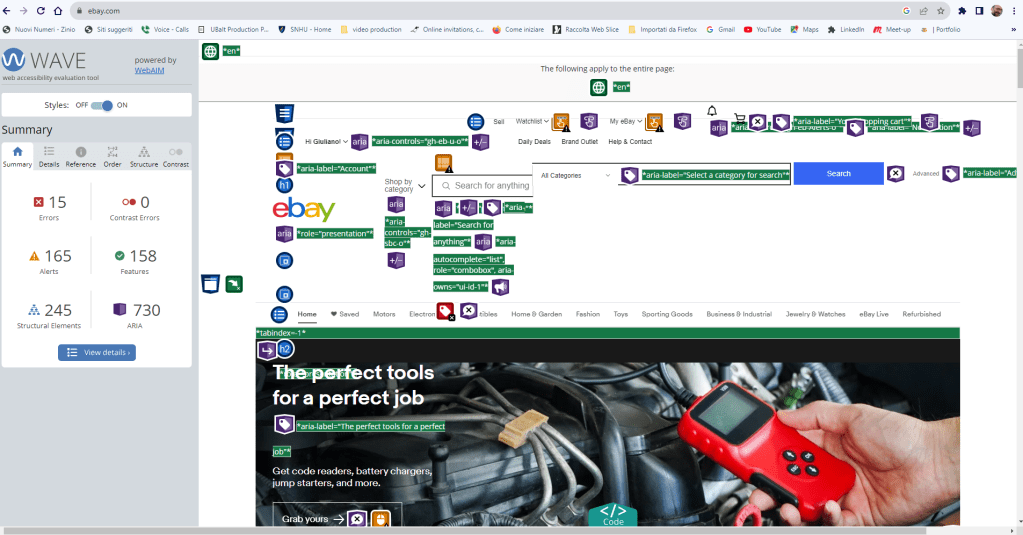
    eBay is probably one of the most clicked online stores worldwide, and it surprised me to see how the Wave evaluation revealed 15 errors and 165 alerts on its home page. Here, I am going to analyze a few errors as many repeat themselves, and how we might fix them.

    Empty button

    <button class=”btn btn–icon btn–tertiary”  data-ebayui=””  type=”button”>

    This error indicates that the button has no value text or is empty, which is an issue since descriptive text must be present to allow users using a screen reader to understand the button’s function.
    How to fix it

    To resolve the problem, just place text content within the <button> element or give the <input> element a value attribute (WAVE reference).

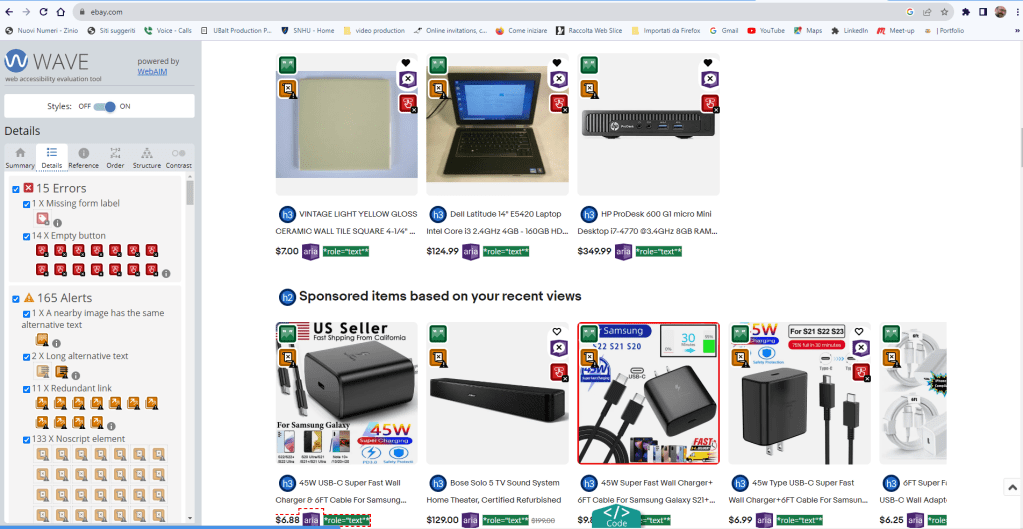
    Missing form label

    <input style=”display: none;”>

    The error refers to a missing label in a form control, which may prevent users using a screen reader from getting the proper association between that form control and its function. 
    How to fix it

    Whenever a text label for a form is visible it should use the <label> element to associate it with its respective from control. If the label is not visible, either use a descriptive title attribute to the form control, add an associated label, or refer labels by using aria-lvelledby. For image, submit, reset, button, or hidden from controls, labels are not required (WAVE reference).

    <label for=”name”>Name:</label>
    <input id=”name” type=”text” autocomplete=”name”>

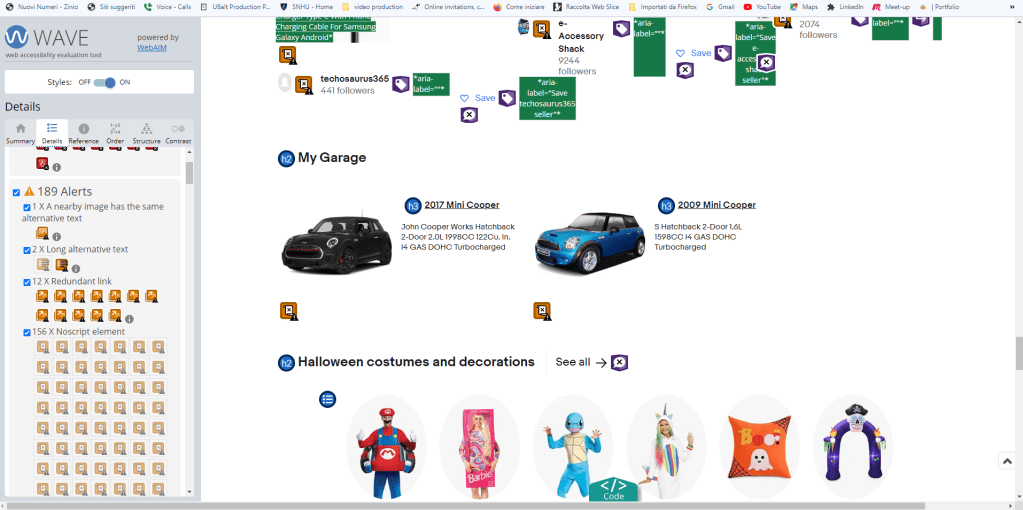
    Same alterantive text

    In this case, the Wave evaluation alerts that adjacent images with the exact alternative text may cause redundancy and confusion.
    How to fix it

    Ensure that alternative texts for each image adequately describe the content. In case of nearby images with alternative text coneying same content, or images without content, the image should be given empty/null alternative text (alt=””). Image buttons never can held null alternative text since they convey specific funtions (WAVE reference).

    Conclusion

    Web developers must create inclusive and accessible websites allowing all users to accede their content besides their different abilities. Thanks to a simple Wave evalutation I see how many digital barrers still affect our virtual space and make difficult or sometimes impossible to access websites’ content for many.

    The fact we do not see those barrers it doesn’t mean that they do not exist. A more attentive to accessibility coding mindset it is required to any webdeveloper that want the Web space be a positive experience for all.
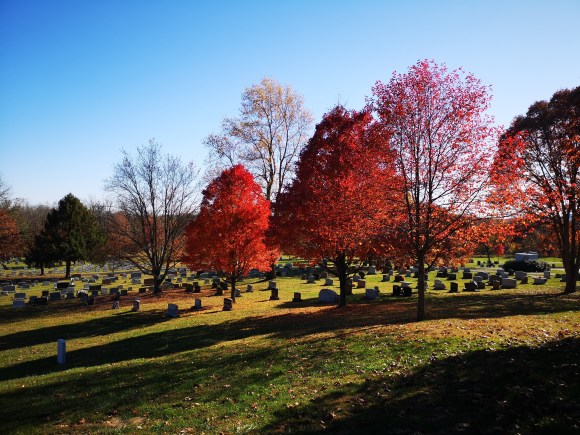
  • In a warm November Sunday afternoon I took a quick visit to Gettysburg, a National Military Park not so far from Baltimore. The weather was delightful and the evening brightness made the fall colors even more vibrant.

    Fall Colors foliage at the Cemetery of Gettysburg

    The Battle of Gettysburg, fought from July 1 to July 3, 1863, is considered the most important engagement of the American Civil War. After a great victory over Union forces at Chancellorsville, General Robert E. Lee marched his Army of Northern Virginia into Pennsylvania in late June 1863. On July 1, the advancing Confederates clashed with the Union’s Army of the Potomac, commanded by General George G. Meade, at the crossroads town of Gettysburg. The next day saw even heavier fighting, as the Confederates attacked the Federals on both left and right. On July 3, Lee ordered an attack by fewer than 15,000 troops on the enemy’s center at Cemetery Ridge. The assault, known as “Pickett’s Charge,” managed to pierce the Union lines but eventually failed at the cost of thousands of rebel casualties. Lee was forced to withdraw his battered army toward Virginia on July 4. The Union had won in a major turning point, stopping Lee’s invasion of the North. It inspired Lincoln’s “Gettysburg Address,” which became one of the most famous speeches of all time.

  • This is an example post, originally published as part of Blogging University. Enroll in one of our ten programs, and start your blog right.

    You’re going to publish a post today. Don’t worry about how your blog looks. Don’t worry if you haven’t given it a name yet, or you’re feeling overwhelmed. Just click the “New Post” button, and tell us why you’re here.

    Why do this?

    • Because it gives new readers context. What are you about? Why should they read your blog?
    • Because it will help you focus your own ideas about your blog and what you’d like to do with it.

    The post can be short or long, a personal intro to your life or a bloggy mission statement, a manifesto for the future or a simple outline of your the types of things you hope to publish.

    To help you get started, here are a few questions:

    • Why are you blogging publicly, rather than keeping a personal journal?
    • What topics do you think you’ll write about?
    • Who would you love to connect with via your blog?
    • If you blog successfully throughout the next year, what would you hope to have accomplished?

    You’re not locked into any of this; one of the wonderful things about blogs is how they constantly evolve as we learn, grow, and interact with one another — but it’s good to know where and why you started, and articulating your goals may just give you a few other post ideas.

    Can’t think how to get started? Just write the first thing that pops into your head. Anne Lamott, author of a book on writing we love, says that you need to give yourself permission to write a “crappy first draft”. Anne makes a great point — just start writing, and worry about editing it later.

    When you’re ready to publish, give your post three to five tags that describe your blog’s focus — writing, photography, fiction, parenting, food, cars, movies, sports, whatever. These tags will help others who care about your topics find you in the Reader. Make sure one of the tags is “zerotohero,” so other new bloggers can find you, too.

  • This is an example post, originally published as part of Blogging University. Enroll in one of our ten programs, and start your blog right.

    You’re going to publish a post today. Don’t worry about how your blog looks. Don’t worry if you haven’t given it a name yet, or you’re feeling overwhelmed. Just click the “New Post” button, and tell us why you’re here.

    Why do this?

    • Because it gives new readers context. What are you about? Why should they read your blog?
    • Because it will help you focus your own ideas about your blog and what you’d like to do with it.

    The post can be short or long, a personal intro to your life or a bloggy mission statement, a manifesto for the future or a simple outline of your the types of things you hope to publish.

    To help you get started, here are a few questions:

    • Why are you blogging publicly, rather than keeping a personal journal?
    • What topics do you think you’ll write about?
    • Who would you love to connect with via your blog?
    • If you blog successfully throughout the next year, what would you hope to have accomplished?

    You’re not locked into any of this; one of the wonderful things about blogs is how they constantly evolve as we learn, grow, and interact with one another — but it’s good to know where and why you started, and articulating your goals may just give you a few other post ideas.

    Can’t think how to get started? Just write the first thing that pops into your head. Anne Lamott, author of a book on writing we love, says that you need to give yourself permission to write a “crappy first draft”. Anne makes a great point — just start writing, and worry about editing it later.

    When you’re ready to publish, give your post three to five tags that describe your blog’s focus — writing, photography, fiction, parenting, food, cars, movies, sports, whatever. These tags will help others who care about your topics find you in the Reader. Make sure one of the tags is “zerotohero,” so other new bloggers can find you, too.